nigel-test

Default Title
General Questions
Bright Horizons has always provided emergency back-up care via their Compass booking system.
We are working towards an enhanced system called Compass 2.0 where we plan to incorporate the best features from all our legacy platforms.
A. All bookings will have a reference attached and our dedicated booking team will assist you with any questions or queries you may have. Please note, a booking reference can cover either an individual day of care or multiple days of care depending on how many days an employee decides to book at that moment in time.
A.
- If you have a query about your Compass booking, please contact our Compass Booking Team on 0800 247 1101.
- If you have a query about Compass provider payments, please email BUCProviderPaymentQueries@brighthorizons.com
- If you have a query about your Compass account, please email BUCProviderEnquiries@brighthorizons.com
A. We have a dedicated Network Growth team to support providers with joining our network. The team will reach out to you to complete our Provider Setup Form. The team will then complete a few simple checks. These include (where applicable) regulatory body checks (i.e. Ofsted/Care Inspectorate/CQC rating) review of insurance documents, ICO registration and food hygiene certificate. As well as discussing your opening hours, rates, our booking process and our cancellation terms to see if it’s a good fit for both parties. If you pass these checks, you will be sent a copy of our provider agreement and compliance statement to sign.
Once we have a returned signed copy of our provider agreement and compliance statement, the team will create your Compass account. This can take up to 21 days to complete and you will be notified once your live.
A. For the Compass system you will need to email BUCProviderEnquiries@brighthorizons.com with the details, and we will update these for you.
A. If an employee cancels before 5pm two working days before the date of care, then no payment will be made to you.
If an employee cancels after 5pm two working days before the date of care, then:
- For Nurseries/Holiday Camps/Childminders - a payment of half of the day rate or the half day rate (if there is one in the system) will be payable to you.
- For Nanny/Adult Care Agencies – A payment of 4hrs will be payable to you, unless the care is cancelled within one hour of the start time on Compass, in which case we will pay the full hours of care.
The provider will always receive an update email, notifying them of the cancellation. For all bookings this will be sent via Mimecast Secure Messaging.
We will notify You of any reservation, cancellation or other change to a reservation. You agree not to accept any requests for reservations, changes or cancellations directly from any Employee and will inform the Employee that they must contact Us directly; You agree and acknowledge that in no event will We be responsible for any agreements made directly between You and an Employee.
Payment Questions
Providing the care is booked and confirmed via our booking system. The employee requesting the care does not pay you (the provider) directly, Bright Horizons cover the full cost of care.
A. Any queries regarding payment should be sent to BUCProviderPaymentQueries@brighthorizons.com
A. Depending on the care type there are different options, please see the guide below and if you have any questions, please contact BUCProviderPaymentQueries@brighthorizons.com
Care type
Compass
Nanny Agency
Manual invoicing
Adult Care Agency
Manual invoicing
Childminders
Auto pay*
Holiday Camps
Auto pay*
Nurseries
Auto pay*
Virtual Tutoring
Manual Invoicing
Pet Care
Manual Invoicing
If manual invoices are required, please send them into:
*Holiday camps, Childminders & Nurseries are automatically set up on autopay for Compass, unless you specifically ask not to. If you would prefer to manually invoice, please let the team know during the registration stage.
A. Auto Pay for new setups
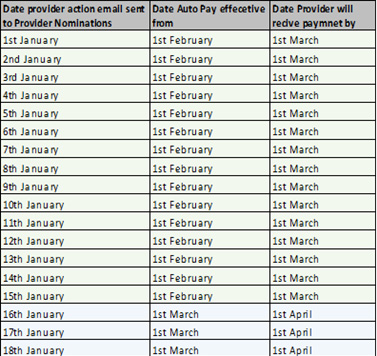
We do an Autopay set up run once a month around the 15th. Any new providers that have joined Compass between the last set up run and this one (15th of previous month to 15th of this month) will be included in the set-up report, our finance team will then set up the providers autopay profiles in the system ready for the 1st of the next month to start receiving payment by 1st of the month following month. (Example table of dates below)
Due to the timings of the initial autopay set up, if providers wish to manually invoice for the first month to receive payment quicker, they are welcome to do so. Please follow the instructions in the following Q&A to find out how to complete a manual invoice and where to send it. Once autopay is set up there is no need to complete any further manual invoices.
Ongoing Auto Pay Timings
We automatically generate an invoice on the first day of each calendar month, for the services provided in the preceding calendar month - We pay each invoice within 30 days of its generation.
You will also receive a spread sheet via Mimecast Secure Messaging detailing all care details from the previous month by the 15th of the current month, so if there are any errors, you can inform us before the payment is made.
N.B It is the responsibility of our Providers to reconcile the report they receive against their books. They will receive this by the 15th of the month prior to the payment being made on 1st of the following month. If for any reason you notice any discrepancies when reconciling the report, please notify us within 5 working days to provider.billinguk@brighthorizons.com
As mentioned above, depending on when, within the month, you are initially set up for Autopay, you may miss the monthly cut off for the first payment, the payment the following month will include this unless you choose to manually invoice during the first month to receive the payment quicker.
A. We ask all providers to complete a registration set up form upon joining the network, included in this is a section to complete with your bank details. This is what we will use to set up your accounting profile which determines where your payments are sent. If your bank details change or you are not sure if we have the correct details, then please contact the provider relations team BUCProviderEnquiries@brighthorizons.com with the correct details so your accounting profile can be updated.
Please note, we do not cross reference the bank details on the invoice with your accounting profile on our system, so simply updating the details on the invoice is not sufficient, you must notify the team using the email above.
Invoicing for Nanny bookings
A. We pay our Nanny agencies a set fee rate per hour of care provided. These rates are discussed and agreed with you before joining the network. When and what you choose to pay your Nannies is entirely your decision and responsibility.
You will need to invoice Bright Horizons for the care provided. You will need to wait until all days of care under the booking reference have been completed before you can invoice for it but other than that you can send through invoices as frequently as you would like, some providers choose to do this after every completed booking, others decide to complete fortnightly invoicing and do lots of bookings at once. The choice is yours but please note that bookings are paid 30 days from the date the billing team receive your invoice (not 30 days from when care is complete). All Compass invoices must be sent through to provider.billinguk@brighthorizons.com
Invoicing for Adult Care Bookings
A. All invoices need to be sent to provider.billinguk@brighthorizons.com
Please note that bookings are paid 30 days from the date the billing team receive your invoice.

